Add-ons
1. Overview
Add-ons are used to support 3rd party systems like game platforms, text moderation, etc. You can install or uninstall the add-on on the portal. Only installed add-ons work for your title region. You can also modify the parameters of the installed add-ons anytime. You should be careful to check the parameters before you save them since it will work soon after saving.
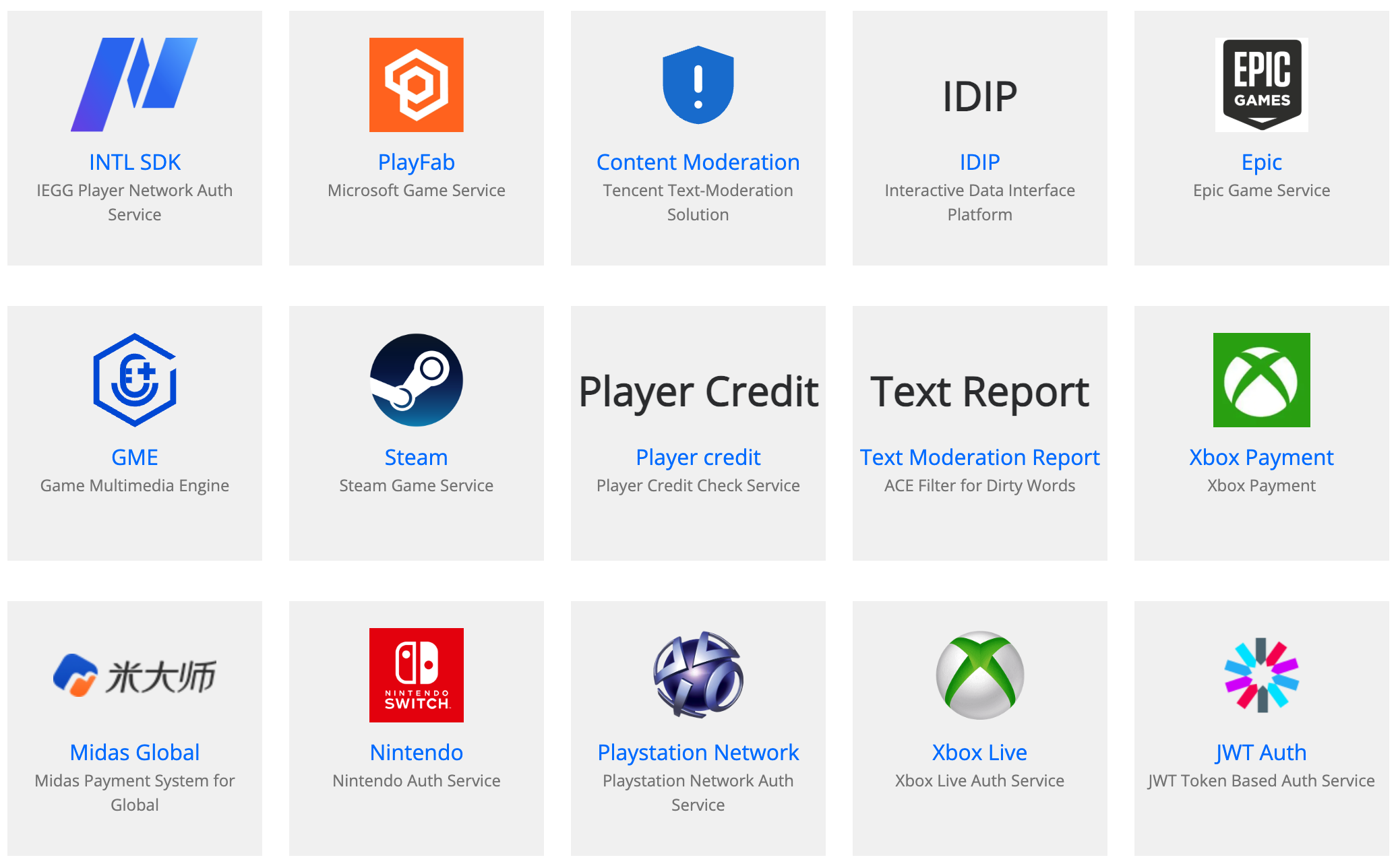
2. Add-on Category
There are several categories of add-ons:
Auth add-on
Auth add-on is used to integrate 3rd-party authentication services for games like Steam, Epic, Xbox, Apple ID, etc. We also support account solution that encapsulates 3rd-party authentication, such as Tencent in-house INTL SDK. You may need to know how to implement the login flow on your client side. Here is the detailed manual for it.
提示NOTE: Once you configured the auth add-on correctly, PGOS can verify the auth openID and token on the backend side. But before it works, you need to integrate the client SDK/API on the client side by yourself in advance.
Moderation add-on
Moderation add-on is used to integrate 3rd-party content moderation services. Once you configured it correctly, it will work soon on the backend side. This add-on works for all UGC content filtering like chat messages, player names, etc.
Middleware add-on
Middleware add-on is used to integrate 3rd-party middleware like IDIP/IDIP.
Payment add-on
Payment add-on is used to integrate payment systems like Tencent Midas, Xsolla, etc.
3. Auth Add-on
3.1 Intl Auth (Player Network Authentication)
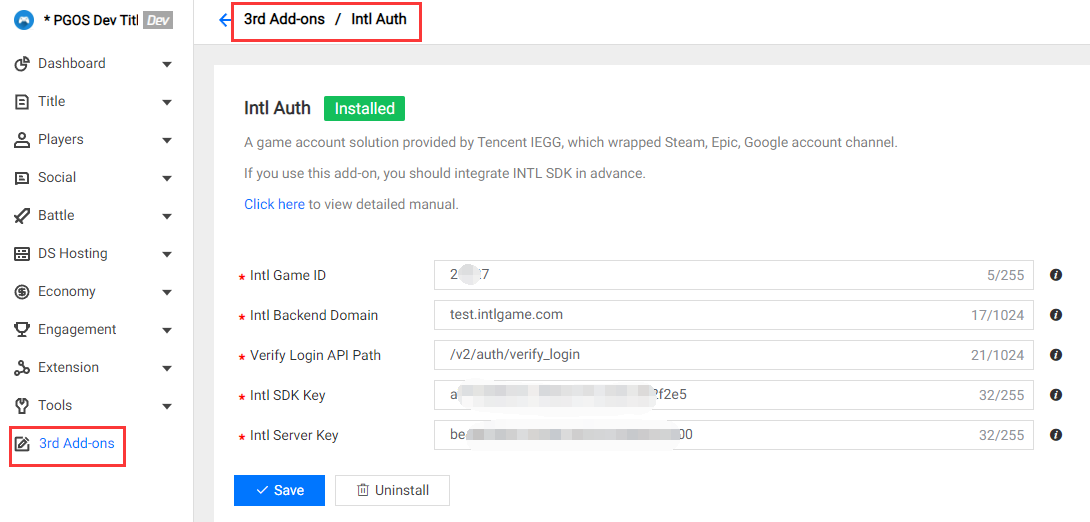
Field Description:
- Intl Game ID: The target Intl game id of current title region.
- Intl Backend Domain: The target Intl backend domain, for example: test.intlgame.com.
- Verify Login API Path: The target Intl verify login API path, for example: /v2/auth/verify_login.
- Intl SDK Key: The target Intl sdk key of current title region.
- Intl Server Key: The target Intl server key of current title region.
Further Reading:
3.2 WeGame Auth
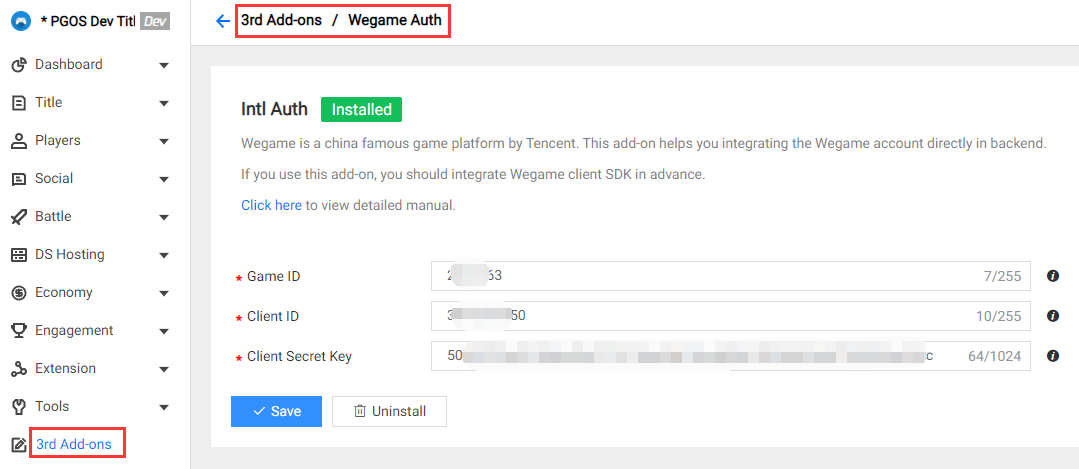
Field Description:
- Game ID: The target wegame game id of current title region.
- Client ID: The target wegame client id of current title region.
- Client Secret Key: The target wegame client secret key of current title region.
Further Reading:
3.3 PlayFab Auth
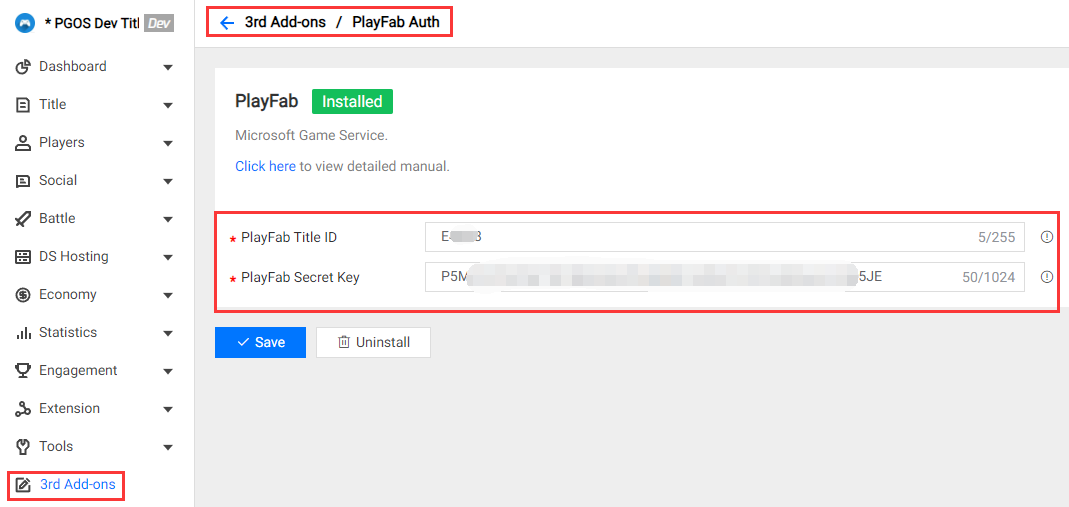
Field Description:
PlayFab Title ID : The target title id on PlayFab.
PlayFab Secret Key: The secret key on PlayFab.
How to get the PlayFab Secret Key:
Log in to the PlayFab dashboard of your game: https://developer.playfab.com/en-US/my-games
Enter Settings >Title settings:
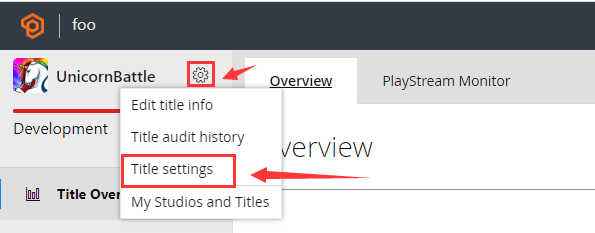
Click the Secret Keys tab to view the secret key:
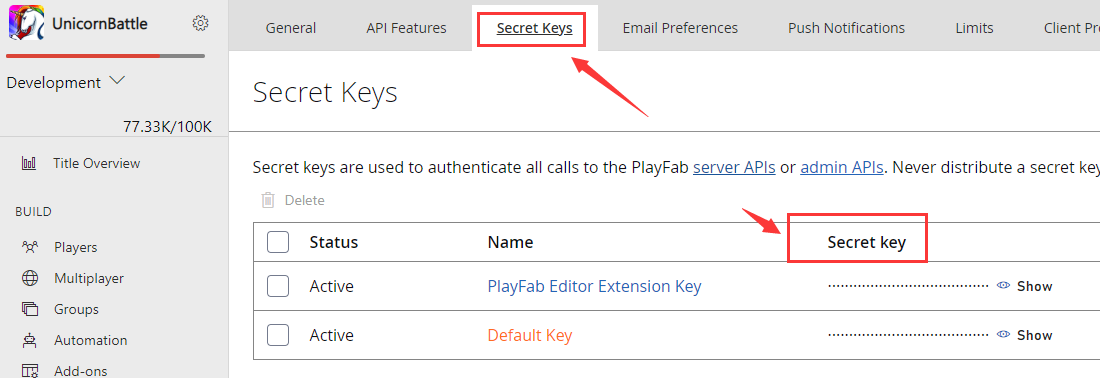
Further Reading:
3.4 Epic Auth
There is no field for Epic Auth.
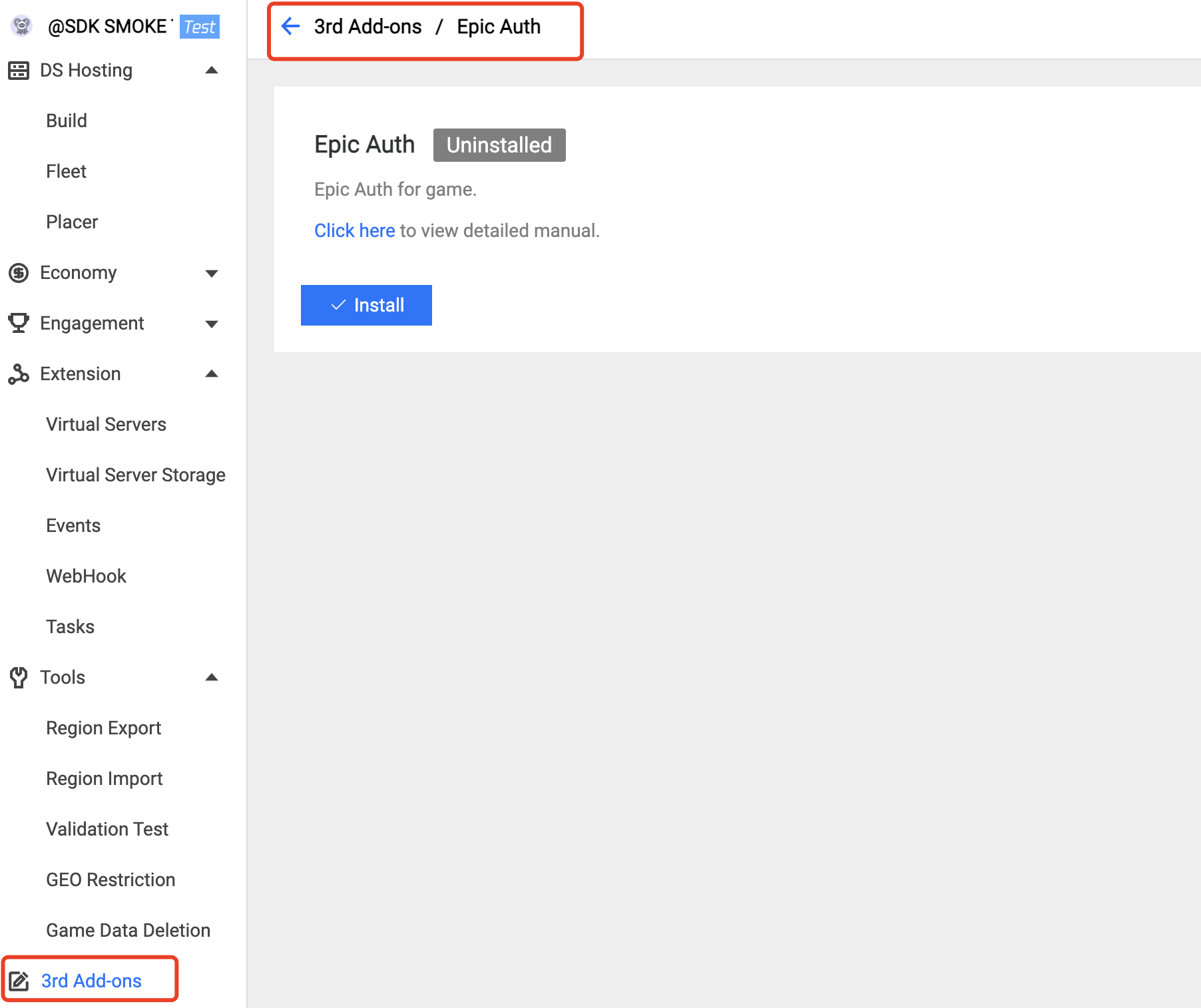
Further Reading:
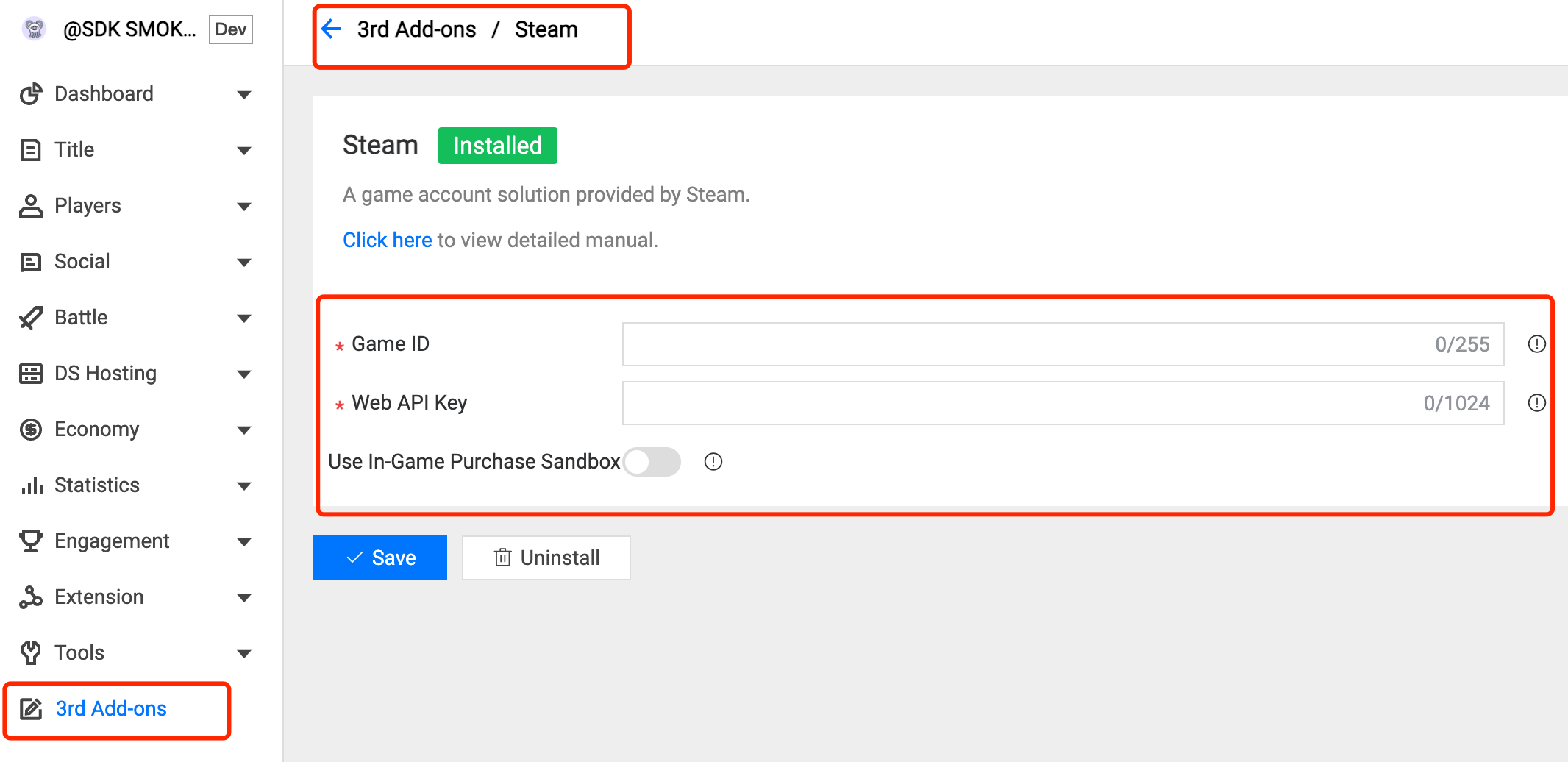
3.5 Steam Auth
Field Description:
Game ID: The target game ID on Steam.
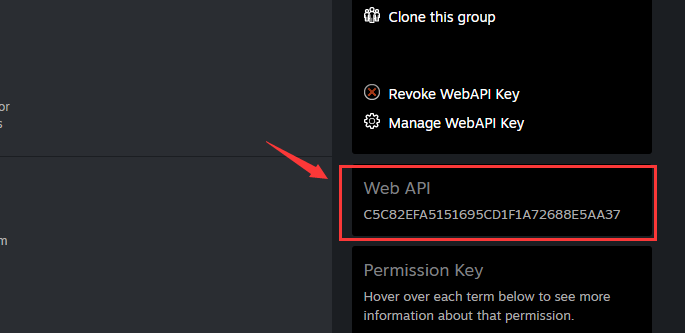
Web API Key: The server key on Steam. Click here to get more information.
How to get steam Web API Key:
Log in to https://partner.steamgames.com/.
Enter User & Permissions > Manage Groups.
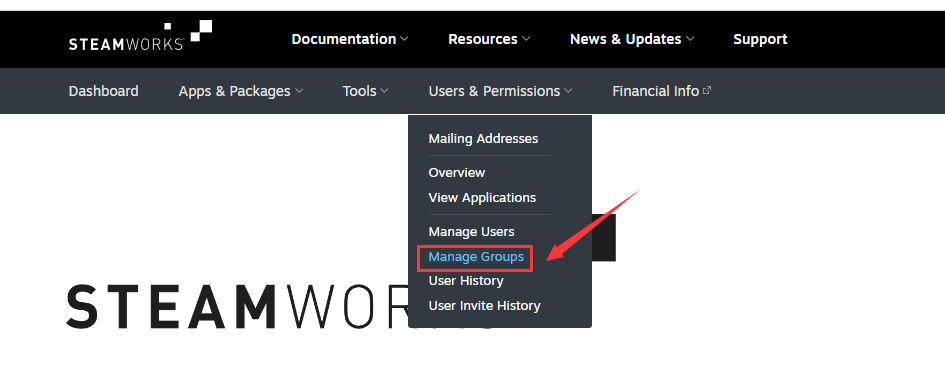
Click the group of your application.

The Web API Key is on the right.
Use In-Game Purchase Sandbox: For the in-game purchase sandbox, optional.
Further Reading:
3.6 XboxLive Auth
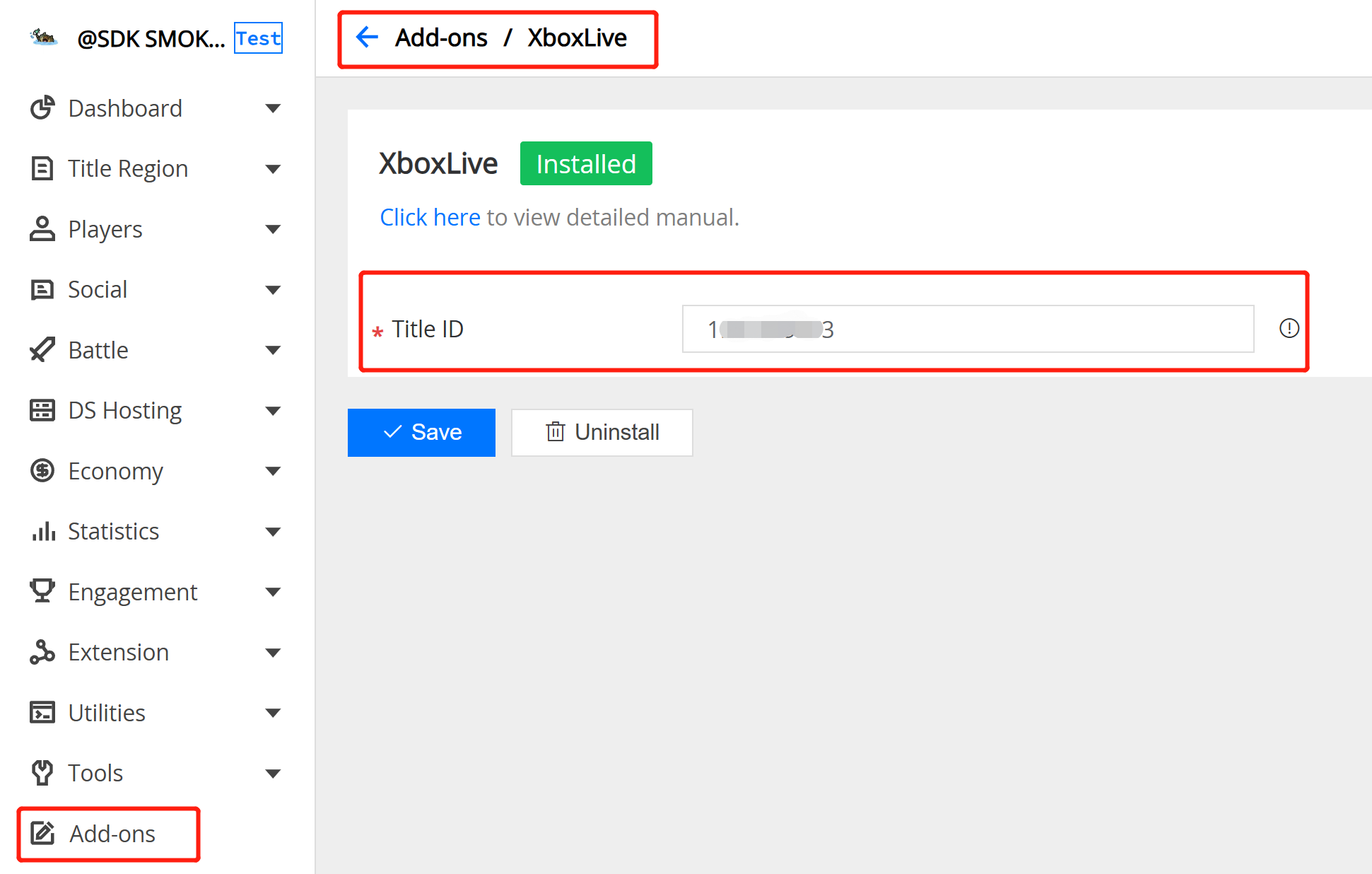
Field Description:
- XboxLive Title ID : The target decimal title id on XboxLive .
Further Reading:
3.7 PlayStationNetwork Auth
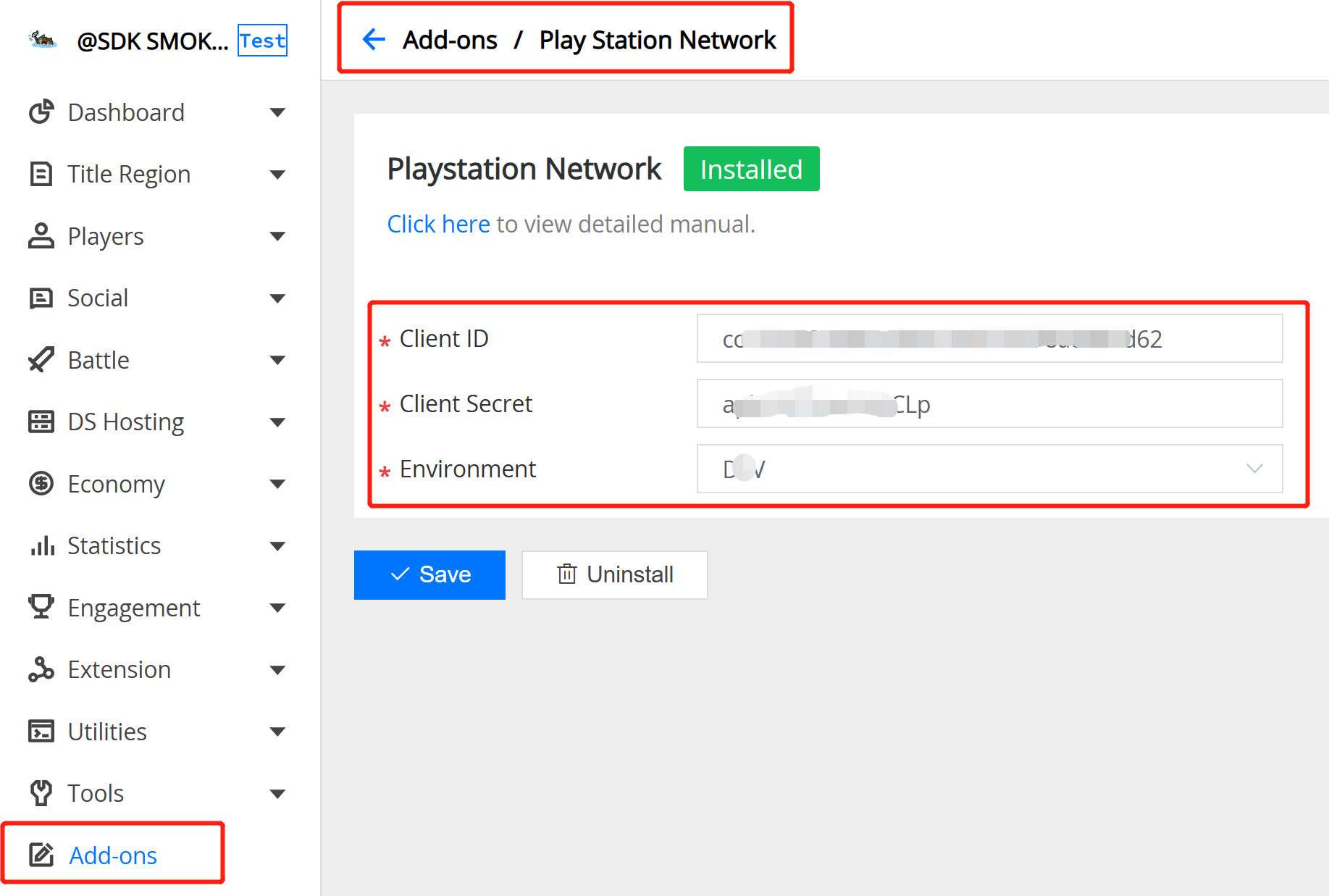
Field Description:
- PlayStationNetwork Client ID : The target client id on PlayStationNetwork.
- PlayStationNetwork Client Secret : The target client secret on PlayStationNetwork.
- PlayStationNetwork Environment : The target environment on PlayStationNetwork.
Further Reading:
Since PGOS uses the PlayStation Auth Web API to conduct PlayStation authentication operations, and PlayStation requires that servers need to be added to the IP whitelist. If you want to use the Playstation add-on, please contact PGOS to obtain the IP information and then add it to the PlayStation IP whitelist.
3.8 Nintendo Auth
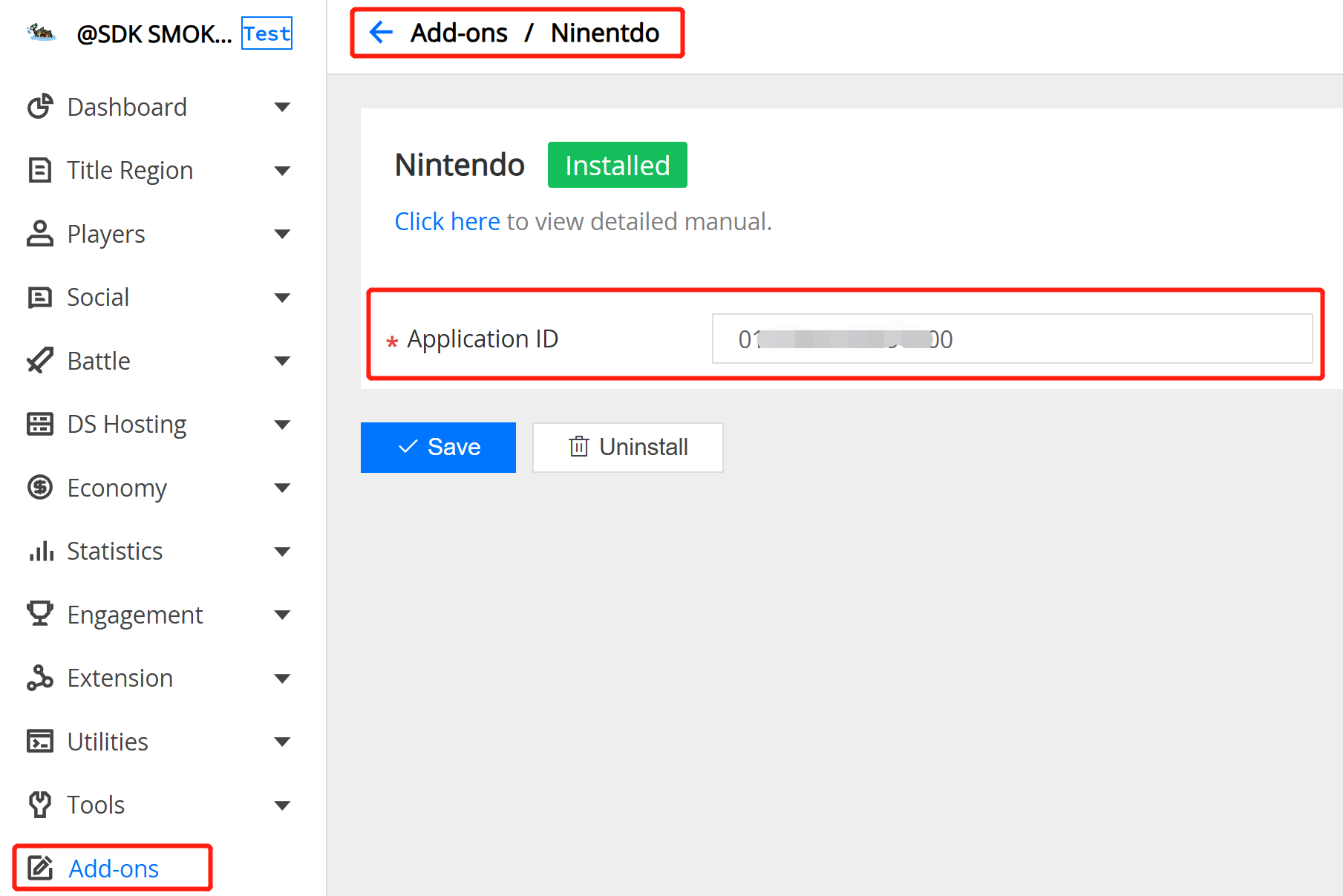
Field Description:
- Nintendo Application ID : The target application id on Nintendo.
Further Reading:
3.9 JWT Auth
JWT(JSON Web Token)是一种开放标准(RFC 7519),允许您使用自己的身份提供商来验证玩家身份。要使用 JWT 登录 PGOS,您必须先在门户控制台上安装 JWT 插件并配置 JWT 验证设置,然后才能开始编码工作。
JWT(JSON Web Token)是一种紧凑的、URL 安全的令牌格式,用于在各方之间安全地传输信息。如需详细了解,请访问 https://jwt.io/introduction。
基本结构:JWT 由三部分组成,用点(.)分隔:
header.payload.signature
- Header(头部):包含令牌类型(
typ)和签名算法(alg),例如:{"alg": "RS256", "typ": "JWT"} - Payload(载荷):包含声明(claims,即用户数据),例如:
{"sub": "user123", "exp": 1735000000, "iss": "my-auth-server"} - Signature(签名):通过使用密钥对编码后的 header 和 payload 进行签名生成,用于验证令牌未被篡改
每个部分都经过 Base64URL 编码,最终生成的令牌格式如:eyJhbGciOiJSUzI1NiJ9.eyJzdWIiOiJ1c2VyMTIzIn0.signature...
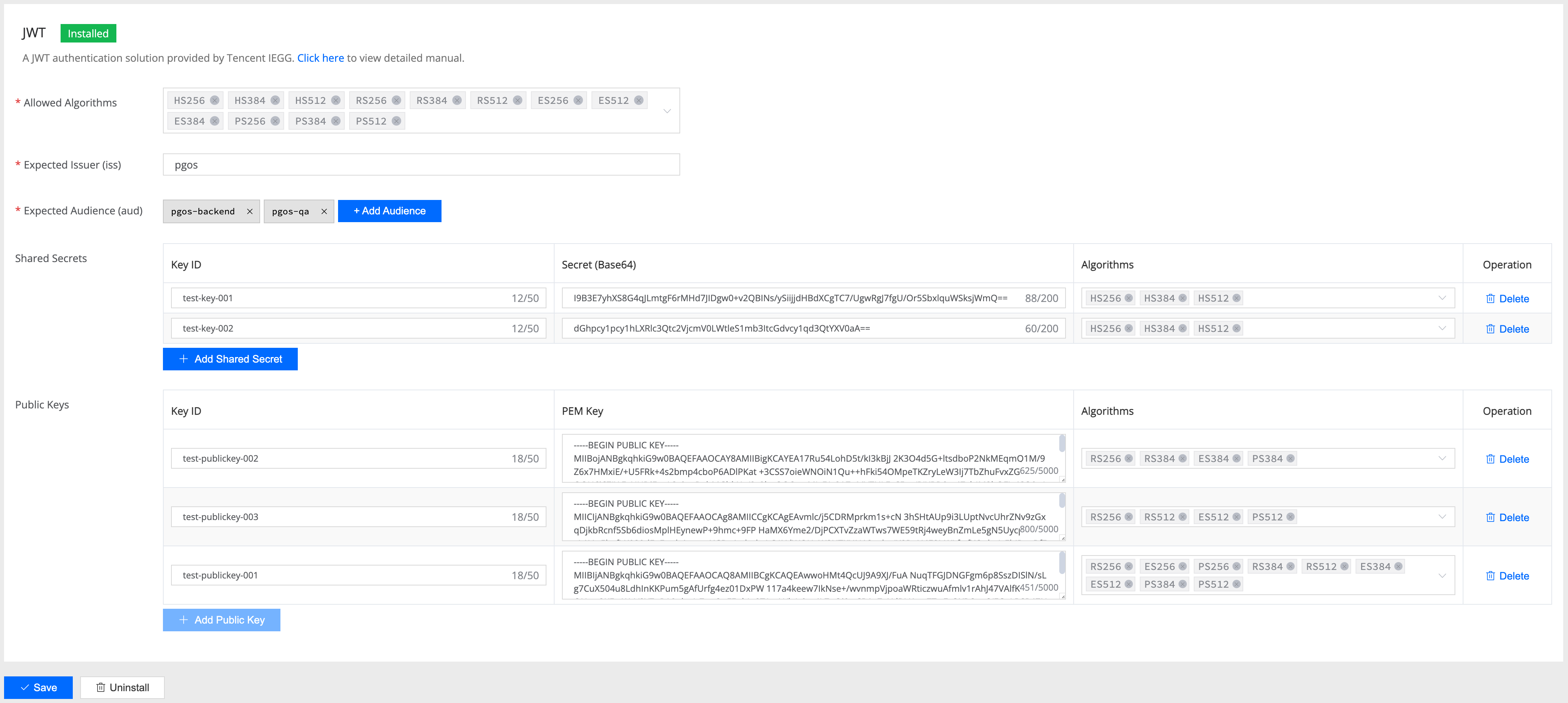
Allowed Algorithms(允许的算法)
- 含义: 服务端接受的 JWT 签名算法白名单
- 作用: 防止算法降级攻击,限制客户端只能使用安全的算法
- 示例:
["HS256", "HS384", "HS512", "RS256", "ES256"] - 安全性: 建议只启用必要的算法,避免支持过多算法增加攻击面
Expected Issuer(预期签发者)
- 含义: JWT Token 中
iss字段的预期值 - 作用: 验证 Token 来源的可信性,确保只接受指定签发者的 Token
- 示例:
"https://auth.example.com"或"game-auth-service" - 验证: 如果配置了此字段,JWT 的
iss声明必须完全匹配
Expected Audiences(预期受众)
- 含义: JWT Token 中
aud字段的预期值列表 - 作用: 确保 Token 是为当前服务签发的,防止 Token 被其他服务误用
- 示例:
["game-api", "user-service"] - 验证: JWT 的
aud声明必须包含配置中的至少一个值
Shared Secrets(共享密钥)
用于 HMAC 算法(HS256/HS384/HS512)的对称加密验证:
kid(Key ID)
含义: 密钥标识符,用于区分不同的密钥
作用: JWT Header 中的
kid字段指定使用哪个密钥验证示例:
"main-key-2024","backup-key"用途: 支持密钥轮换和多密钥管理
secret(密钥内容)
含义: Base64 编码的 HMAC 密钥
作用: 用于验证 JWT 签名的实际密钥材料
示例:
"dGVzdC1zZWNyZXQtMTIzNDU2Nzg5MA=="(base64 编码)安全: 必须足够长且随机,建议 64 字节以上
algorithms(支持的算法)
含义: 该密钥支持的 HMAC 算法列表
作用: 一个密钥可以支持多种算法,提供灵活性
示例:
["HS256", "HS384", "HS512"]优势: 简化密钥管理,支持渐进式算法升级
Public Keys(公钥)
用于 RSA/ECDSA 算法(RS256/ES256 等)的非对称加密验证:
kid(Key ID)
含义: 公钥标识符,与 Shared Secrets 中的 kid 作用相同
作用: JWT Header 中的
kid指定使用哪个公钥验证示例:
"rsa-key-001","ecdsa-key-prod"管理: 通常与私钥成对管理,支持密钥轮换
pem(PEM 格式公钥)
含义: PEM 格式编码的 RSA 或 ECDSA 公钥
作用: 用于验证非对称算法签名的公钥材料,必须是标准的 PEM 格式,包含完整的头尾标记
示例:
-----BEGIN PUBLIC KEY-----
MIIBIjANBgkqhkiG9w0BAQEFAAOCAQ8AMIIBCgKCAQEA...
-----END PUBLIC KEY-----
algorithms(支持的算法)
含义: 该公钥支持的非对称算法列表
作用: 指定公钥可用于哪些签名算法
示例:
["RS256", "RS384", "RS512"]或["ES256", "ES384"]限制: RSA 密钥用于 RS 算法,ECDSA 密钥用于 ES 算法
JWKS Endpoints(JWKS 端点)
JWKS(JSON Web Key Set)端点允许您从远程 URL 动态获取公钥。当您的身份提供商定期轮换密钥时,此功能非常有用。
url(端点地址)
含义: JWKS 端点的 HTTPS URL
作用: PGOS 将从此端点获取并缓存公钥
示例:
"https://auth.example.com/.well-known/jwks.json"要求: 必须是有效的 HTTPS URL
PGOS 支持三种类型的 JWKS 端点 URL,并能自动检测响应格式:
| # | 名称 | 规范 | URL 特征 | 用途 |
|---|---|---|---|---|
| 1 | JWKS (JSON Web Key Set) | RFC 7517 | 通常位于 /.well-known/jwks.json 或由 jwks_uri 指定 | 标准公钥集合格式 ✅ |
| 2 | OpenID Connect Discovery Document | OpenID Connect Discovery 1.0 | .well-known/openid-configuration | 元数据文档,包含 jwks_uri 和其他提供商信息 |
| 3 | X.509 Certificate Chain | Google 私有格式 | /x509/ 或 /metadata/x509/ | PEM 格式证书列表(非标准) |
响应格式示例
1. JWKS (JSON Web Key Set) - 标准格式
// URL: https://www.googleapis.com/service_accounts/v1/jwk/securetoken@system.gserviceaccount.com
{
  "keys": [
    {
      "kid": "abc123def456",
      "kty": "RSA",
      "alg": "RS256",
      "use": "sig",
      "n": "0vx7agoebGcQSuuPiLJXZptN9nn...",
      "e": "AQAB"
    }
  ]
}
这是 RFC 7517 定义的标准格式,包含一个 keys 数组,其中每个元素都是 JWK 对象。
2. OpenID Connect Discovery Document
// URL: https://securetoken.google.com/{project-id}/.well-known/openid-configuration
{
  "issuer": "https://securetoken.google.com/{project-id}",
  "jwks_uri": "https://www.googleapis.com/service_accounts/v1/jwk/securetoken@system.gserviceaccount.com",
  "response_types_supported": ["id_token"],
  "subject_types_supported": ["public"],
  "id_token_signing_alg_values_supported": ["RS256"]
}
当 PGOS 检测到此格式(通过 jwks_uri 字段识别)时,会自动跟随 jwks_uri 获取实际的密钥。
3. X.509 Certificate Chain - Google 私有格式
// URL: https://www.googleapis.com/robot/v1/metadata/x509/securetoken@system.gserviceaccount.com
{
  "kid1": "-----BEGIN CERTIFICATE-----\nMIIDHDCC...\n-----END CERTIFICATE-----\n",
  "kid2": "-----BEGIN CERTIFICATE-----\nMIIDHDCC...\n-----END CERTIFICATE-----\n"
}
这是 Google 特有的格式,每个键是 kid -> PEM Certificate 的映射。PGOS 会从每个证书中提取公钥。
自动格式检测
PGOS 根据响应内容自动检测并解析以上三种格式:
- 如果响应包含
keys数组 → 按 JWKS 格式解析 - 如果响应包含
jwks_uri字段 → 自动跟随该 URI 获取密钥 - 如果所有值都是 PEM 证书 → 按 X.509 格式解析
这使您可以配置任意一种 URL 类型,无需额外设置。
使用 JWKS 端点时,密钥轮换是一个重要的考虑因素。以下是推荐的实践方案:
1. 密钥轮换重叠期(推荐)
在轮换密钥时,您的身份提供商应在过渡期间同时发布新旧两个密钥。这确保了使用任一密钥签名的令牌都可以被验证,不会中断服务。
阶段 1: { keys: [KeyA] }           // 仅旧密钥
阶段 2: { keys: [KeyA, KeyB] }     // 过渡期间两个密钥并存
阶段 3: { keys: [KeyB] }           // 仅新密钥
这是主流身份提供商(Auth0、Okta、Google 等)采用的行业标准做法,强烈建议您的实现也遵循此方案。
2. 未知 Kid 自动刷新
当 PGOS 遇到当前缓存中不存在的 kid 时,会自动刷新 JWKS 缓存。这使得新密钥可以被发现,而无需等待缓存过期。但是,此刷新有频率限制(默认:每个端点每 5 分钟一次)以防止滥用。
重要提示:如果在缓存刷新之前收到带有新 kid 的令牌,第一次请求将失败并返回"密钥未找到"错误。后续请求(在缓存刷新之后)将会成功。这就是为什么强烈推荐方法 1(密钥轮换重叠期)——它可以完全避免这个问题。
3. HTTP Cache-Control 支持
PGOS 遵循 JWKS 端点响应中的 Cache-Control: max-age 头。如果您的身份提供商返回此头,PGOS 将使用它来确定缓存 TTL,根据您的提供商建议确保最佳的缓存更新频率。
JWT 令牌要求
JWT 令牌应包含以下声明:
| 声明 | 是否必需 | 说明 |
|---|---|---|
kid | 必需 | JWT 头部中的密钥 ID。用于标识使用哪个密钥进行验证。 |
exp | 必需 | 过期时间。令牌过期后将被拒绝。 |
iss | 条件必需 | 签发者。如果配置了 expected_issuer 则必需。 |
aud | 条件必需 | 受众。如果配置了 expected_audience 则必需。 |
sub | 可选 | 主题标识符。如果配置了,必须与 account_open_id 匹配。 |
jti | 可选 | JWT ID。如果存在,将用于防止重放攻击。 |
iat | 可选 | 签发时间。用于配合时钟偏差容忍度进行验证。 |
nbf | 可选 | 生效时间。在此时间之前使用令牌将被拒绝。 |
PGOS 如何查找密钥
在验证 JWT 时,PGOS 使用令牌头部中的 kid(密钥 ID)和 alg(算法)来查找匹配的密钥。查找遵循以下优先级顺序:
- Shared Secrets(用于对称算法,如 HS256/HS384/HS512)
- Public Keys(用于非对称算法,如 RS256/ES256)
- JWKS Endpoints(远程密钥集)
PGOS 搜索同时匹配 kid 和 alg 的密钥。如果找到匹配 kid 的密钥但不支持请求的算法,PGOS 会继续在下一个密钥来源中搜索。
避免重复的 Kid 值
强烈建议在所有配置的密钥(Shared Secrets、Public Keys 和 JWKS)中使用唯一的 kid 值。如果多个密钥共享相同的 kid:
- 密钥按
kid和alg同时匹配,因此使用不同算法的不同密钥类型(对称 vs 非对称)即使kid相同也可能正常工作 - 但是,这可能导致配置混乱和意外行为
- 如果两个密钥具有相同的
kid和重叠的算法,只有第一个(按优先级顺序)会被使用
最佳实践:为每个密钥分配唯一的、描述性的 kid,例如 "hmac-prod-2024"、"rsa-key-v2" 或 "ecdsa-signing-key"。
支持的算法
| 算法 | 类型 | 说明 |
|---|---|---|
| HS256 | 对称 | 使用 SHA-256 的 HMAC |
| HS384 | 对称 | 使用 SHA-384 的 HMAC |
| HS512 | 对称 | 使用 SHA-512 的 HMAC |
| RS256 | 非对称 | 使用 SHA-256 的 RSA 签名 |
| RS384 | 非对称 | 使用 SHA-384 的 RSA 签名 |
| RS512 | 非对称 | 使用 SHA-512 的 RSA 签名 |
| ES256 | 非对称 | 使用 P-256 曲线和 SHA-256 的 ECDSA |
| ES384 | 非对称 | 使用 P-384 曲线和 SHA-384 的 ECDSA |
| ES512 | 非对称 | 使用 P-521 曲线和 SHA-512 的 ECDSA |
| PS256 | 非对称 | 使用 SHA-256 的 RSA-PSS |
| PS384 | 非对称 | 使用 SHA-384 的 RSA-PSS |
| PS512 | 非对称 | 使用 SHA-512 的 RSA-PSS |
Further Reading:
4. Moderation Add-on
4.1 Content Moderation
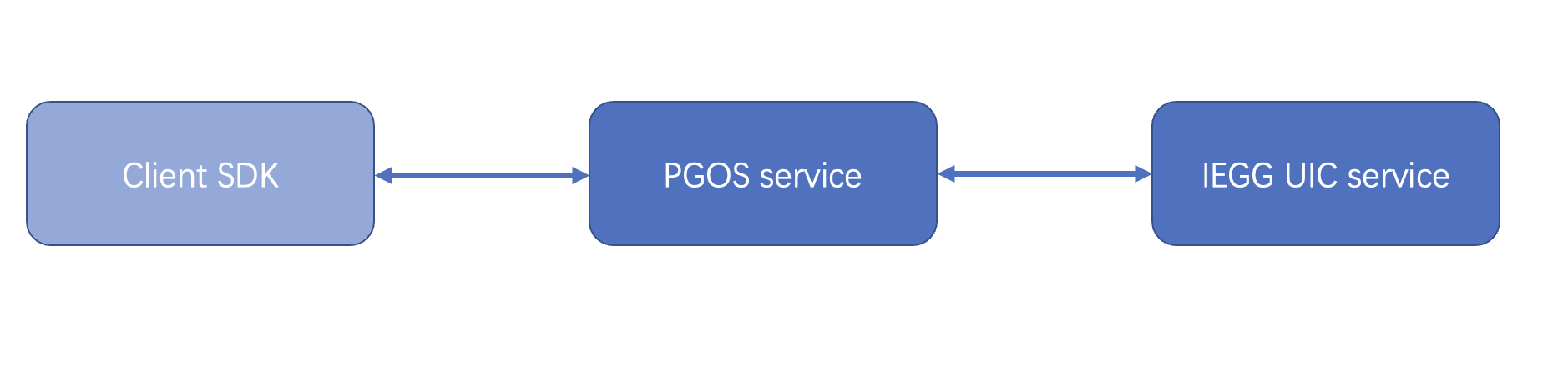
ACE SDK provides profanity-checking and filtering functionality ( User Input Service). PGOS adapted to the ACE SDK and provides an add-on to enable content moderation for related API.
4.1.1 Content Moderation Integration
You can set the content moderation configuration on the portal.
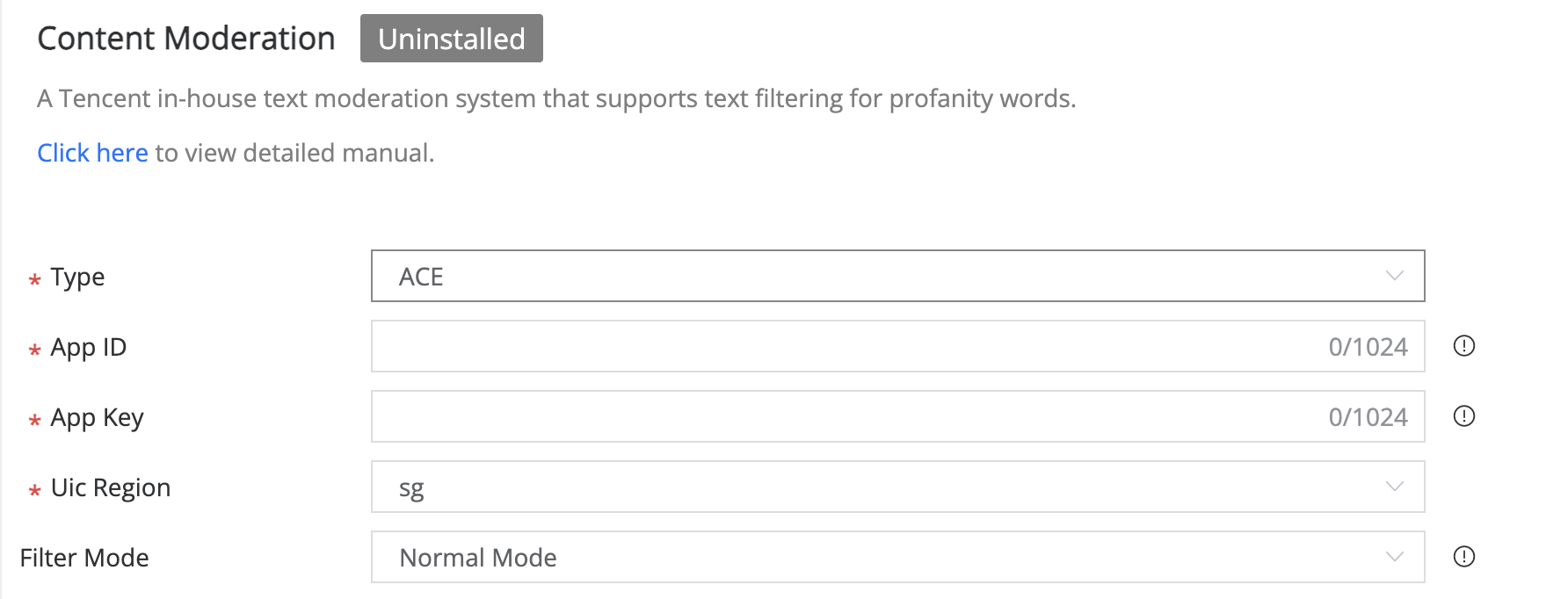
There are two different filter modes:
- Normal Mode: Different API calls behave differently when sensitive words are detected, please refer to the document to see the logic Related API and Profanity Handling.
- Strict Mode: When sensitive words are detected, all API calls will return an error.
4.1.2 Field Description
- Enabled: switch to enable content moderation.
- APP ID: IEGG UIC service APP ID of the game.
- APP KEY: IEGG UIC service APP KEY of the game.
- UIC Region: the region where content moderation services are used.
- Filter Mode: Different modes apply to different countries' policies.
4.1.3 Related API and Profanity Handling
| API | Profanity Handling |
|---|---|
| SendInstantChatMsg SendPersonalTextMsg SendGroupTextMsg | In normal mode, when there are sensitive words, the API will directly filter the sensitive words and return success. The API call will return an error in strict mode if sensitive words are detected. |
| SetGroupDesc SetGroupAnnouncement | In normal mode, when input content is with sensitive words, the API will filter the sensitive words, return success, and also indicate there are sensitive words. The API calling will return an error in strict mode if sensitive words detected |
| SetMyName CreateParty CreateLobby EditLobbyInfo SetMyGroupNickName CreateGroup SetGroupName SetGroupMemberRemark | No matter what the filter mode is, when there are sensitive words, the API call will return an error. Please refer to the key error handling in the corresponding service manual for more details. |
4.1.4 Reporting of TSS information
TSS needs to submit relevant information every time it detects, The way to report can view the document
4.2 Content Moderation Report
Only used for Tencent games released in China Mainland.
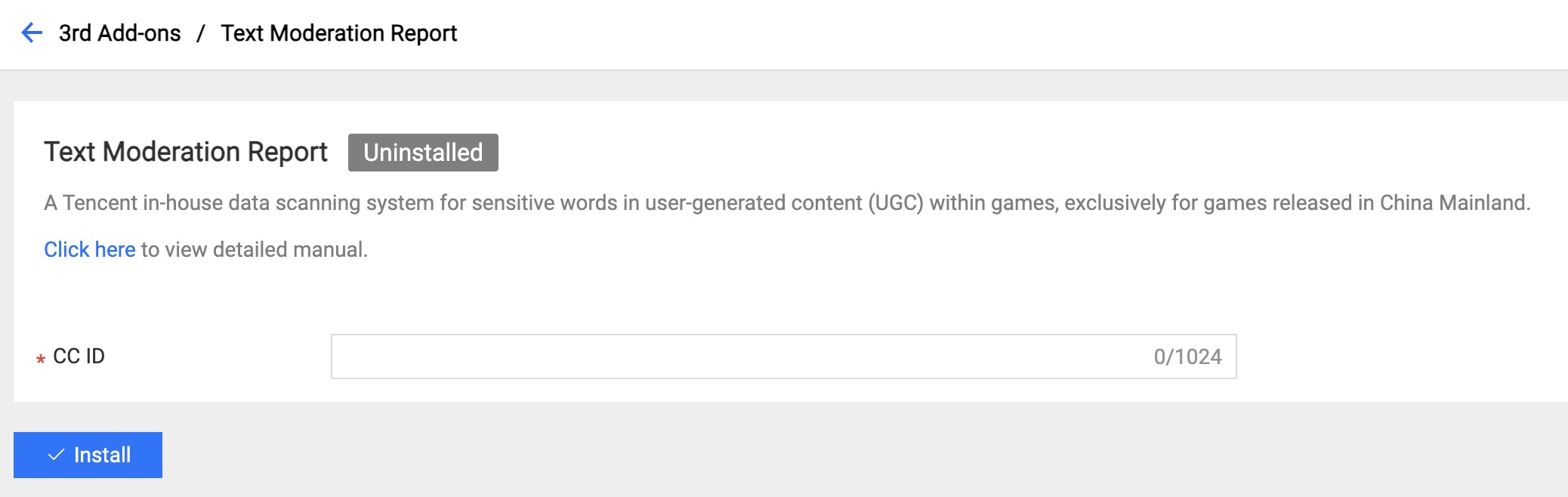
Field Description:
- CC ID: The ID of the game registered from the platform.
5. Middleware Add-on
5.1 IDIP
IDIP is a service that allows the interaction between the operation merchandising system and the core data of your game, which is deployed outside PGOS.
IDIP is commonly used in marketing services for the following purposes:
- Award player with items
- Query players' activities
- Ban or unban a player
- Send mail to players
- ......
In general, If you integrate IDIP directly, you need to implement an HTTP server that responds to IDIP requests.
However, If a game uses PGOS, we provide an adapter service to route all IDIP requests to the Virtual Server, so you can write Node.JS code to handle IDIP requests.
To integrate IDIP on PGOS, two things need to be done:
- Configure the PGOS Adapter with a secret key and paste the callback URL to the IDIP side.
- Write virtual server code to handle IDIP requests.
5.1.1 IDIP Integration Steps
Firstly, you need to register your game at the IDIP web portal
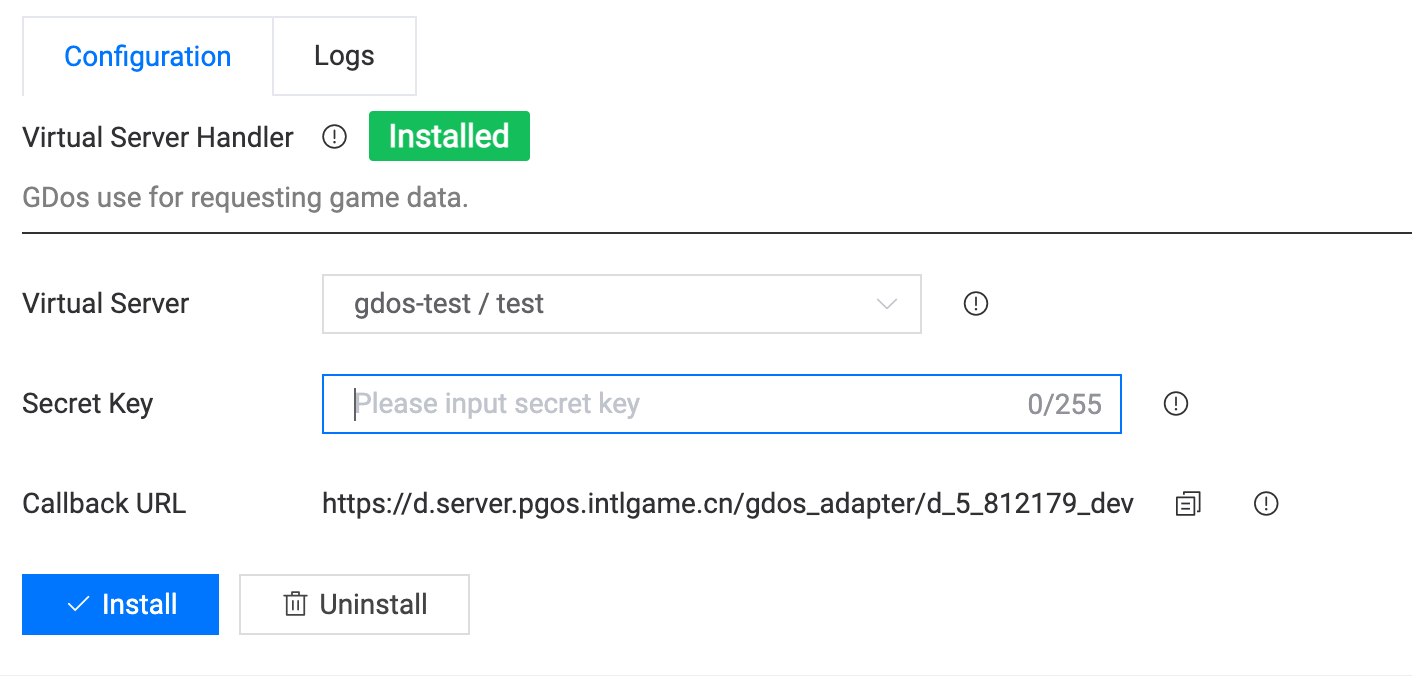
Then three steps need to be done on the PGOS web portal:
- Specify a virtual server function to use as an IDIP request handler.
- Input the secret key, and ensure its value is the same as
IDIP_sig_keyconfigured on the IDIP Portal. - Copy and paste the Callback URL to the
IDIP_server_infosection on the IDIP Portal.
The last step is to handle IDIP requests in your virtual server functions according to the agreement of the IDIP Protocol
5.1.2 Virtual Server Sample
When an IDIP request is submitted, your virtual server will be triggered with the following parameters, which carry the data of the original IDIP request.
The function is an entrance to all incoming IDIP requests. You can manually import the dependent nodejs package if needed.
This is a fake virtual server sample that always returns a fixed IDIP response.
'use strict';

const server = require('virtual-server-framework/api');

/**
 * @author pgos
 * @interface test
 * @description xxxxxx
 * @time 2021.01.01
 */
exports.test = async (args, context) => {
  console.log('TEST');
  console.log(args);
  console.log(context);
  let rsp = {};
  // 4097 is sample cmdid of the player info query interface on IDIP.
  // convert openid to playerID
  let playerIDRsp = await server.OpenIDToPlayerID({
    account_open_id: args.body && args.body.openid,
  });
  if (playerIDRsp && playerIDRsp.result !== 0) {
    rsp = {
      head: {Result: -1, RetErrMsg: 'convert openid failed'},
      body: {Result: -1, RetMsg: 'convert openid failed'},
    };
    return rsp;
  }
  let playerID = playerIDRsp.body.player_id;
  // query player info
  let playerInfoRsp = await server.GetPlayerInfo({player_id: playerID});
  // check data format
  console.log('GetPlayerInfo', JSON.stringify(playerInfoRsp));
  // encapsulate rsp
  if (args && args.head && args.head.Cmdid == 4097) {
    // make sure the rsp struct meets your IDIP response agreement.
    rsp = {
      head: {Result: 0, RetErrMsg: 'success!'},
      body: {
        Result: 0,
        RetMsg: 'OK',
        RoleName: playerInfoRsp && playerInfoRsp.body &&
                playerInfoRsp.body.display_name ||
            '',  // from player info
        RoleId: 23,
        RoleLevel: 10,
        Vip: 0,
        Money: 0,
        RegisterTime: '1394505470',
        LastLoginTime: '1394505486',
      },
    };
  } else {
    // make sure the upstream users know your errcode definition.
    rsp = {
      head: {Result: -1, RetErrMsg: 'not implentmented'},
      body: {Result: -1, RetMsg: 'not implentmented'},
    };
  }
  return rsp;
};
There are two params passed to your virtual function:
argsis the IDIP request struct in the JSON form.contextcontains theTitleID,TitleRegionIDfields, etc.
The structure of args and context are detailly documented here.
❕Note
Please note that
PlayerIdis not included in thecontextparameter. To determine the associatedPlayerIdof the request, please use theOpenIDToPlayerIDfunction to convert from game-specific protocol fields.
Full IDIP request protocol and samples can be referred to the IDIP portal
5.1.3 Virtual Server Debug
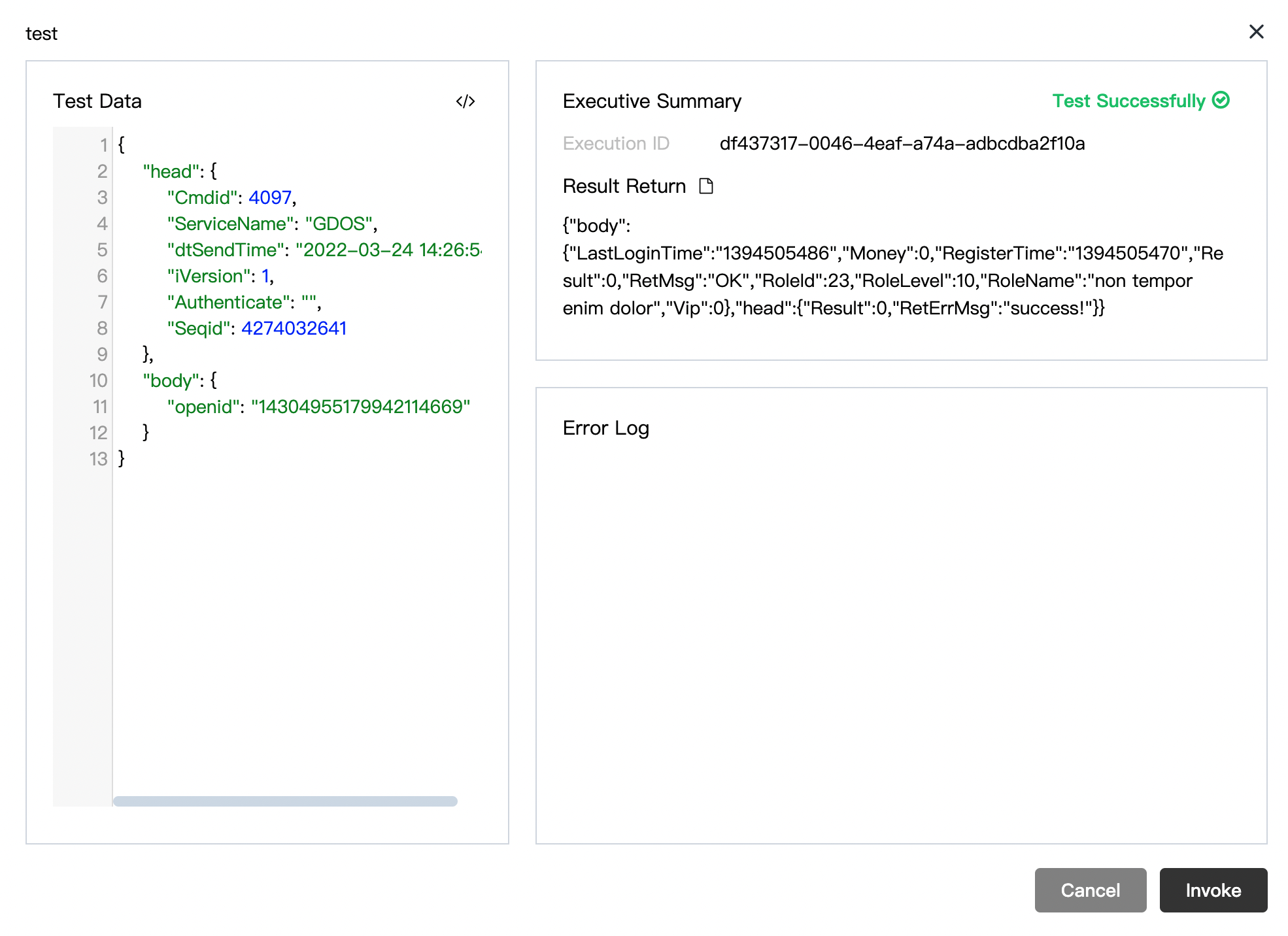
To verify your virtual server function with IDIP request, it's recommended to use the online debugger to trigger your function with custom content. But note that the debug action only happens within PGOS, which differs from real scenes where the invocations are triggered from 3rd party platforms.
When everything runs as expected, you are ready to test the whole process by using the IDIP auto-test tool, which can be referred to the IDIP Portal
5.1.4 Virtual Server API Reference
Access the PGOS server-side interface by importing the virtual-server-framework/api package.
All Virtual Server APIs can be referred to here.
5.2 Player Credit
Only used for Tencent games released in China Mainland.
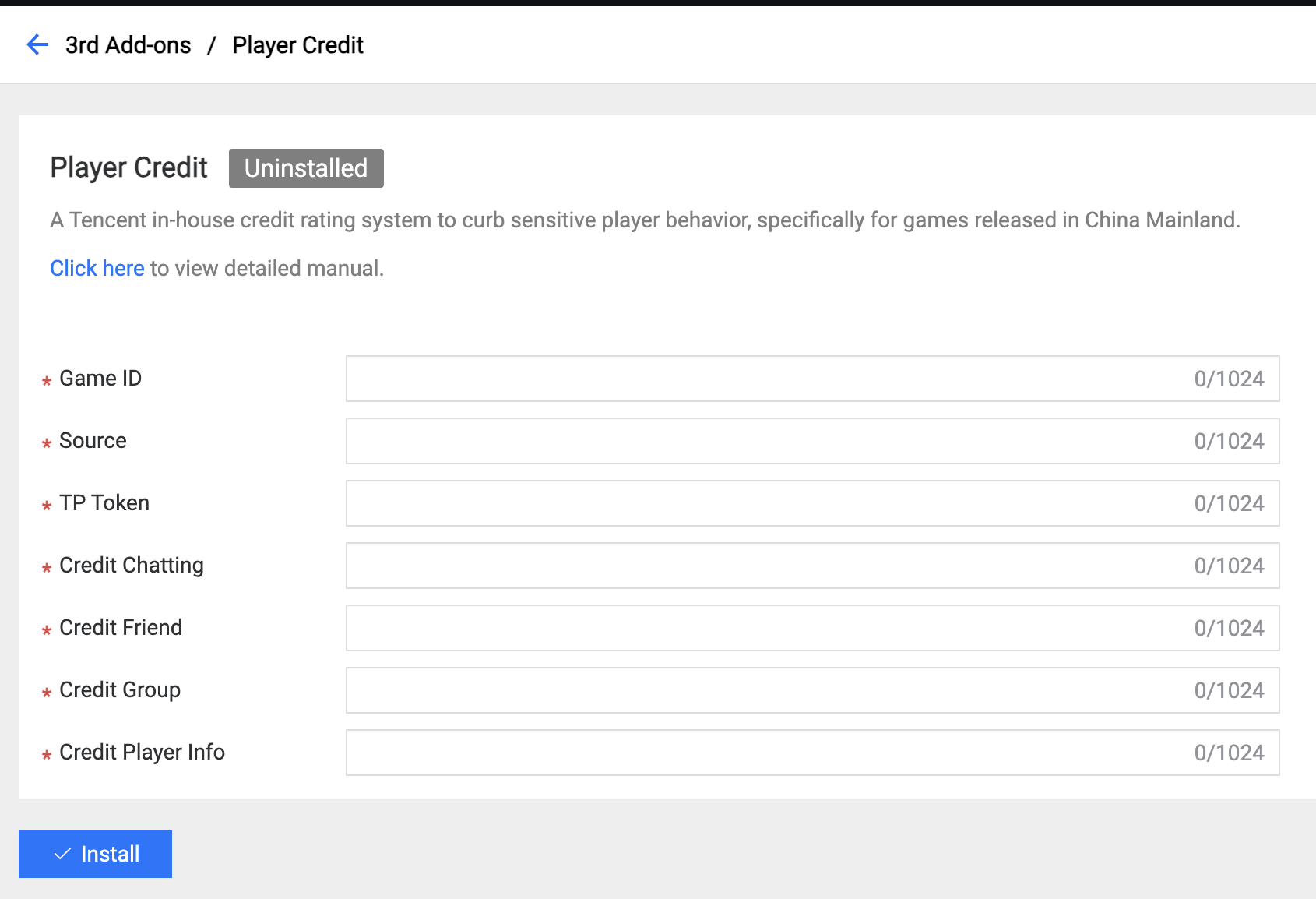
Field Description:
- Game ID: The ID of the game registered from the credit platform.
- Source: The registration source from the credit platform helper.
- TP Token: The TP Token is registered from the credit platform helper.
- Credit Chatting: The scene ID for chatting.
- Credit Friend: The scene ID for a friend.
- Credit Group: The scene ID for a group.
- Credit Player Info: The scene ID for player information.
5.3 GME
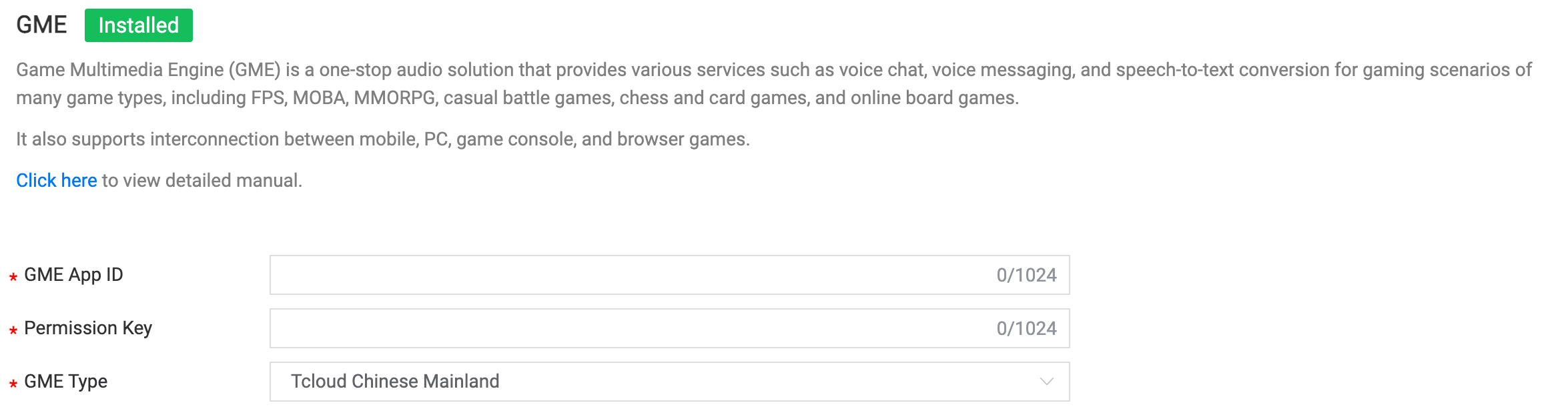
Field Description:
- GME App ID: The app ID generated by the GME platform.
- Permission Key: The permission key generated by the GME platform.
- GME Type: Choose the type for GME usage.
6. Third-party Payment Add-on
6.1 Xbox
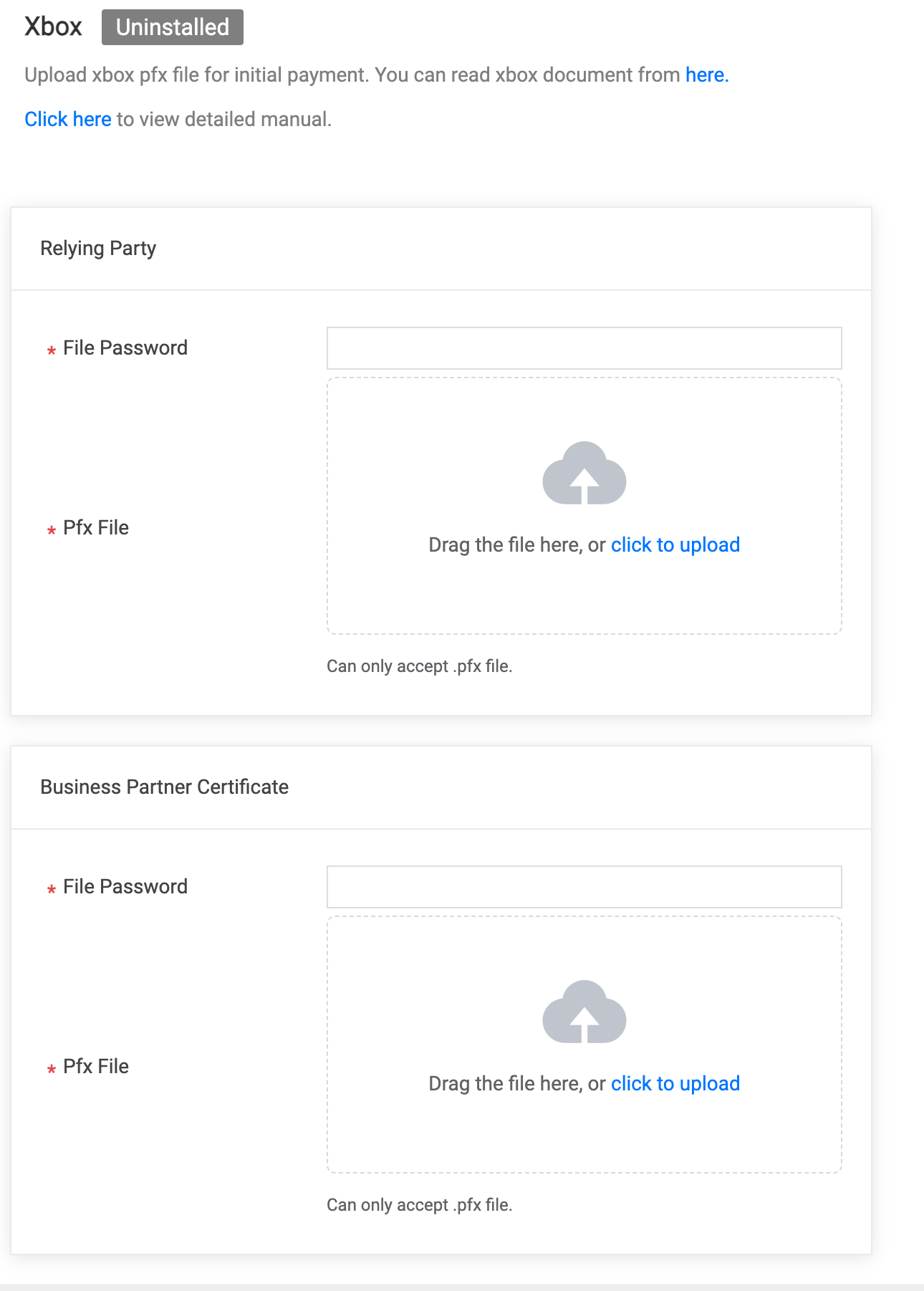
You can upload Relying Party and Business Partner Certificate file to install. Please input file password if exist.
6.2 Midas Global
Games published by Tencent can use the payment service provided by Midas to implement the purchase of items or currency in PGOS. Refer to economy document to learn about the configuration and application of Midas Global Addon.